iperf3
Testing.
A comprehensive guide to TCP Throughput Testing following RFC 6349 methodology.
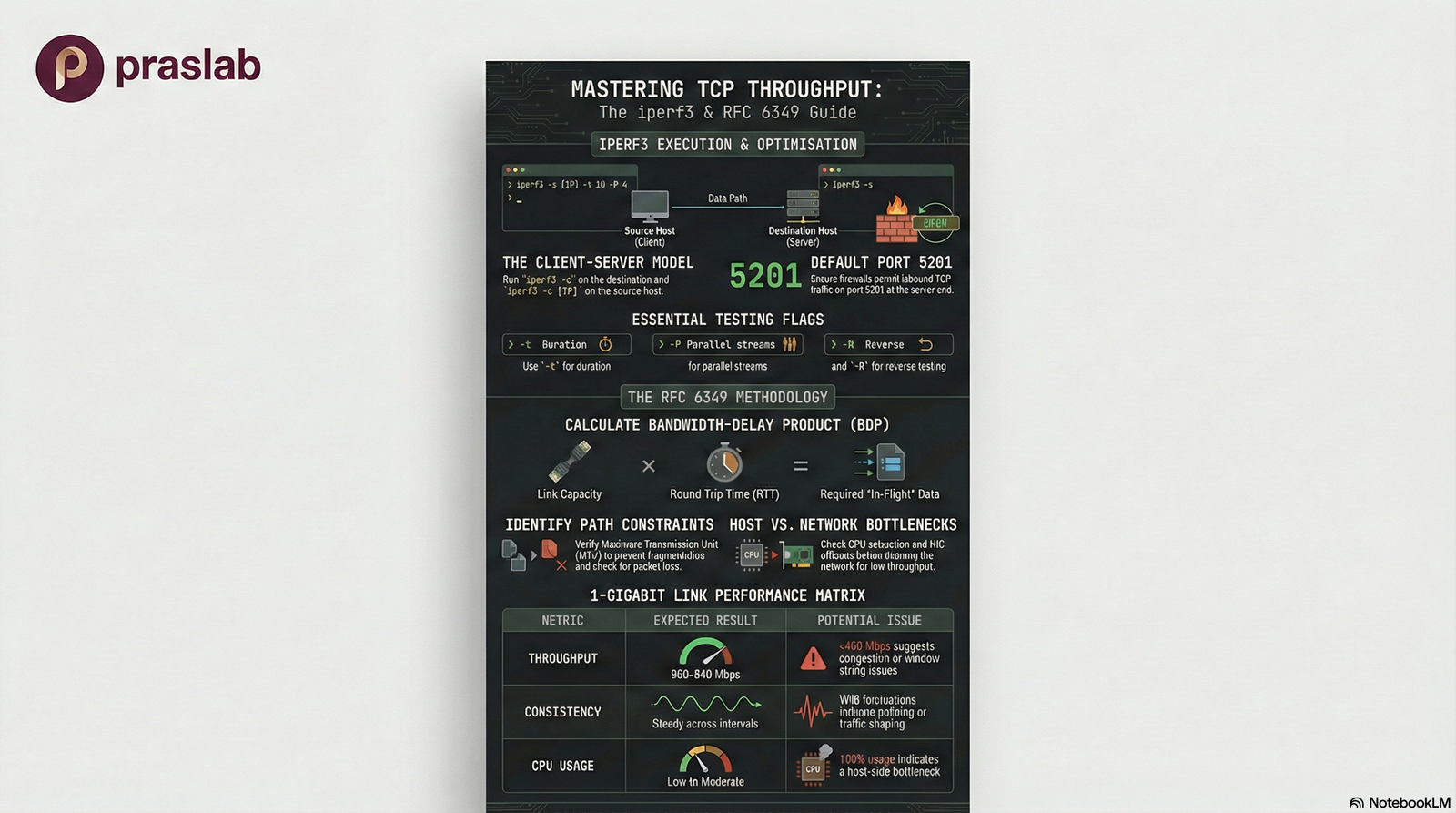
What is iperf3?
iperf3 is an open-source network performance measurement tool that measures maximum achievable bandwidth between two hosts. It uses a client-server model and provides detailed statistics about TCP/UDP throughput.
Why use it? To validate end-to-end TCP throughput, not just theoretical link speed. It measures real-world performance including host stack, NIC, and network path overhead.
Key Goals (RFC 6349)
- Understand Path Characteristics (RTT, MTU)
- Calculate Bandwidth-Delay Product (BDP)
- Compare Measured vs. Theoretical Capacity
🎯 RFC 6349 Methodology
Measure achievable TCP throughput systematically by understanding path characteristics (RTT, MTU, BDP) and comparing measured performance against theoretical capacity.
Test Prerequisites
Network Topology
Prerequisites Checklist
-
✓
IP Connectivity: Ensure routing is configured and both hosts can reach each other
-
✓
Firewall Rules: Allow TCP port 5201 (default) in both directions
-
✓
Path Stability: Avoid testing during maintenance windows or known congestion periods
-
✓
Compatible Versions: Install same or compatible iperf3 versions on both ends (download from iperf.fr)
-
✓
Sufficient Privileges: Root/admin access may be needed for system tuning
Execution: Basic TCP Test
Server Side
Client Side
Sample Output
📊 Interpreting Results
Interval lines: Per-second transfer and bandwidth
Summary: Total bytes transferred and average throughput
End-to-end measurement: Includes host stack, NIC, and entire
network path
Refining Tests
Extended Duration
Use -t 30 or -t 60 to run longer tests and smooth out variations
Parallel Streams
Use -P 4 to run multiple
streams simultaneously for high-BDP links
Reverse Direction
Use -R to test
server-to-client throughput (reverse mode)
Additional Useful Options
-p custom port
-w TCP window size
-J JSON output
-O omit startup seconds
Applying RFC 6349 Concepts
📚 RFC 6349: Framework for TCP Throughput Testing
RFC 6349 provides a systematic methodology for measuring and validating TCP performance. It emphasizes understanding path characteristics before interpreting throughput results.
1. Measure Path Characteristics
- 📡 RTT (Round Trip Time) using ping
- 📦 MTU (Maximum Transmission Unit)
- 🔍 Verify Path MTU Discovery
- 📉 Check for packet loss
2. Calculate BDP
BDP = Bandwidth × RTT
Bandwidth-Delay Product tells you how much data should be "in flight" for full link utilization
3. Design Tests Based on BDP
For high-latency, high-bandwidth links, use:
• Longer test durations (-t 60)
• Multiple parallel streams (-P 4 or more)
• Appropriate TCP window sizing (-w)
4. Compare & Troubleshoot
If measured throughput is much lower than expected, investigate:
• TCP window sizing
• Host CPU/interrupt issues
• Queueing and buffering
• Traffic shaping or policing
• Path-level packet loss
Common Pitfalls & Troubleshooting
⚠️ Firewall Issues
The #1 cause of test failures. Verify TCP port 5201 (or custom port) is allowed in both directions through all firewalls and ACLs.
⚠️ Host Limitations
CPU saturation, especially on single-core, can skew results on high-speed links. Validate hosts can saturate the link before blaming the network.
⚠️ Asymmetric Routing
Policy-based routing can cause unexpected paths. Forward and reverse throughput may differ significantly.
⚠️ TCP Window Limitations
Single streams may not fill high-BDP pipes. Use parallel streams and verify OS TCP auto-tuning is enabled.
🔧 Mitigation Strategy
1. Test locally first (same switch/VLAN) to isolate host vs. network issues
2. Temporarily relax firewall rules on test hosts
3. Use longer durations and parallel streams for high-latency links
4. Verify NIC offload features and OS tuning
5. Document everything: versions, parameters, results
Integrated Video: Practical iPerf3 Demonstration